

Smart Entry by Nokē
App Downloads


24/7 Nokē Smart Entry Support
Please don't hesitate to call (833) 257-0240 for any issues with the app or the unit lock. This is a 24/7 support line free for anyone to use.
How-To Video Guides
(coming soon)
Frequently Asked Questions (FAQs)
Getting Started
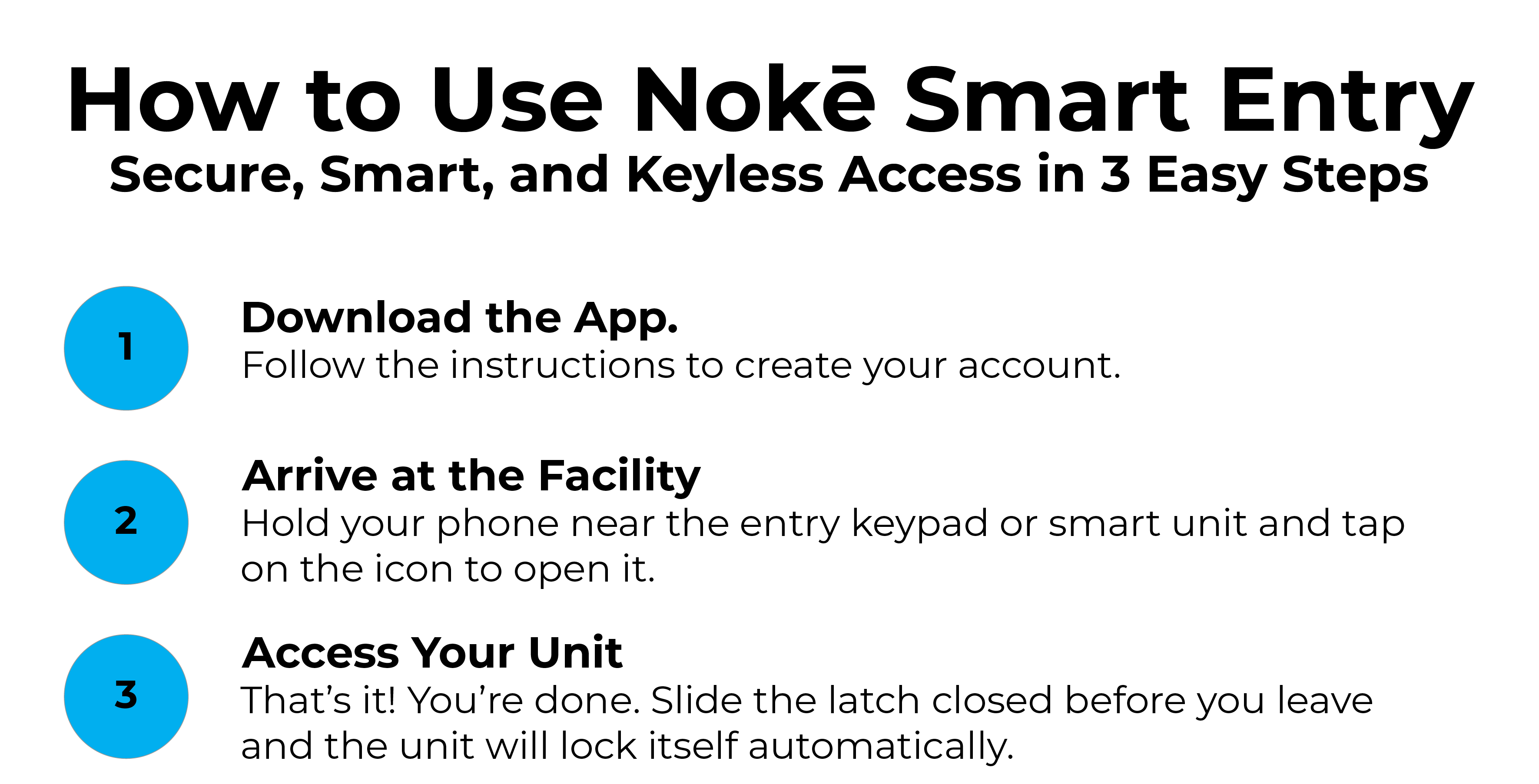
How do I log in for the first time? You will receive a text message and/or email with a link to download the app and a 6-digit temporary PIN. Use your phone number as your username and that PIN as your password. You will then be prompted to create a permanent password.
What if I didn't get the text? Call our office to ensure your phone number is correct in our system. You can also download the app directly from the App Store or Google Play Store and try the "Forgot Password" flow using your registered phone number.
What devices are supported?
iOS: iPhone 5S or newer, running iOS 12.0 or higher.
Android: Galaxy S6 or newer, running Android 6.0 or higher.
What Can I Do With the Smart Entry System vs. Physical Lock/Key?
How will others be able to access my unit? You can be digitally share access to your unit(s) with friends, family, or co-workers from within the app. Access can be shared for a set period of time or indefinitely. Access to the unit can be revoked at any time, and an access log will keep track of who accessed the unit and when. You can share access from anywhere in the world and with anyone that has a compatible smartphone!
What about 24/7 Access? For security reasons, access hours to the facility has historically been between 6 a.m. and 10 p.m. everyday. With the added security and transparency that the new system brings to our operations, there may be a time in the future that 24/7 access is available to tenants by signing a contract addendum and paying an added fee. Stay tuned!
What About Gate Codes? Gate codes will no longer be necessary to access the property. However, the Smart Entry keypad will continue to support manual gate codes (your gate code will remain unchanged).
What Devices Can I Use? In addition to compatible smart phones, the app can be used on compatible tablets and even Apple Watch devices. With a little bit of know-how, the app has the ability to integrate with Apple Shortcuts, allowing you to ask Siri to open the entry gate and (possibly) your unit (video tutorial coming soon).
Security and Hardware
Is it secure? Very! Nokē Smart Entry uses state of the art encryption to prevent hackers from accessing your unit. By using Bluetooth Low Energy (BLE), the system creates a unique, encrypted "handshake" for every single access event. This means your digital key cannot be intercepted or duplicated, providing a layer of protection that traditional physical keys simply can’t match.
What happens if the facility loses power? All locks are hardwired to a battery back-up and will continue to work during a temporary power-outage. The unit controllers also have onboard memory that can store up to 300 access events to sync once power is restored. In the case that the battery back-up runs out, the electronic locks will fail in the "locked" state.
Are staff able to unlock my unit? Yes and no. Certain management security permissions will allow emergency unlocks for occupied units. Tenants will be notified in the app immediately, and all access to the unit is recorded and saved. For security purposes, on-site staff do not have the ability to emergency unlock units by themselves, and will instead need to contact their supervisor. The emergency unlock ability provides a higher level of transparency and security than regular locking mechanisms.
Physical Security
Is the electronic lock physically secure? Because the lock is not exposed, there is no padlock to cut or cylinder to drill. This eliminates the most common brute force break-in methods.
Is there any other security mechanism in case of a break-in? Yes! Every unit will also include a PIR (passive infrared) motion sensor that can alert our staff if movement is detected inside a unit.
Accessing Your Unit
How do I actually open the lock? Ensure Bluetooth is enabled on your phone. Open the app. Get within Bluetooth range of the entrance keypad and/or unit door (less than 25 feet). When the unit icon highlights in your app, tap it to unlock.
What do the lights mean?
Green: The lock is open/unlocked.
Red: The lock is secured.
Do I need a cell signal at the unit? The app requires a connection (Wi-Fi or cellular) to authenticate when you first open it. However, once the app is open and your digital keys are synced, it uses Bluetooth to talk to the lock, so it can work even in areas with poor reception.
What about...
I don’t have a smartphone?
A Bluetooth fob is available for customers who do not possess a smartphone, or who do not possess a smartphone that meets the minimal requirements. There is a one-time $25 security deposit that will be refunded once the fob is returned back to us.
I would rather use the Bluetooth fob instead of my phone? That's no problem. However, you will miss out on a lot of the features that make the smart entry system so convenient. This includes digital key sharing, unit access logs to know when your unit was accessed and by whom, and unit notifications via the app.
Does the app cost money? No. The Storage Smart Entry by Nokē app is a free downloadable app in the Apple App Store and Google Play Store.
How do I move out? There will be signage posted in key areas of the property with a scannable QR code. This will take you to our Move-Out page with simple instructions on how to move out of your unit. Click Here to review our move-out process.


